
Simmie Readiness / From practice to progress
Sales readiness. See where your team stands.
Track team sales readiness with a dashboard for practice activity, scores, and skill gaps. Ask Simmie questions across your team's calls, then use recommended simulations to turn those gaps into focused practice.
Create a free account. No credit card required.
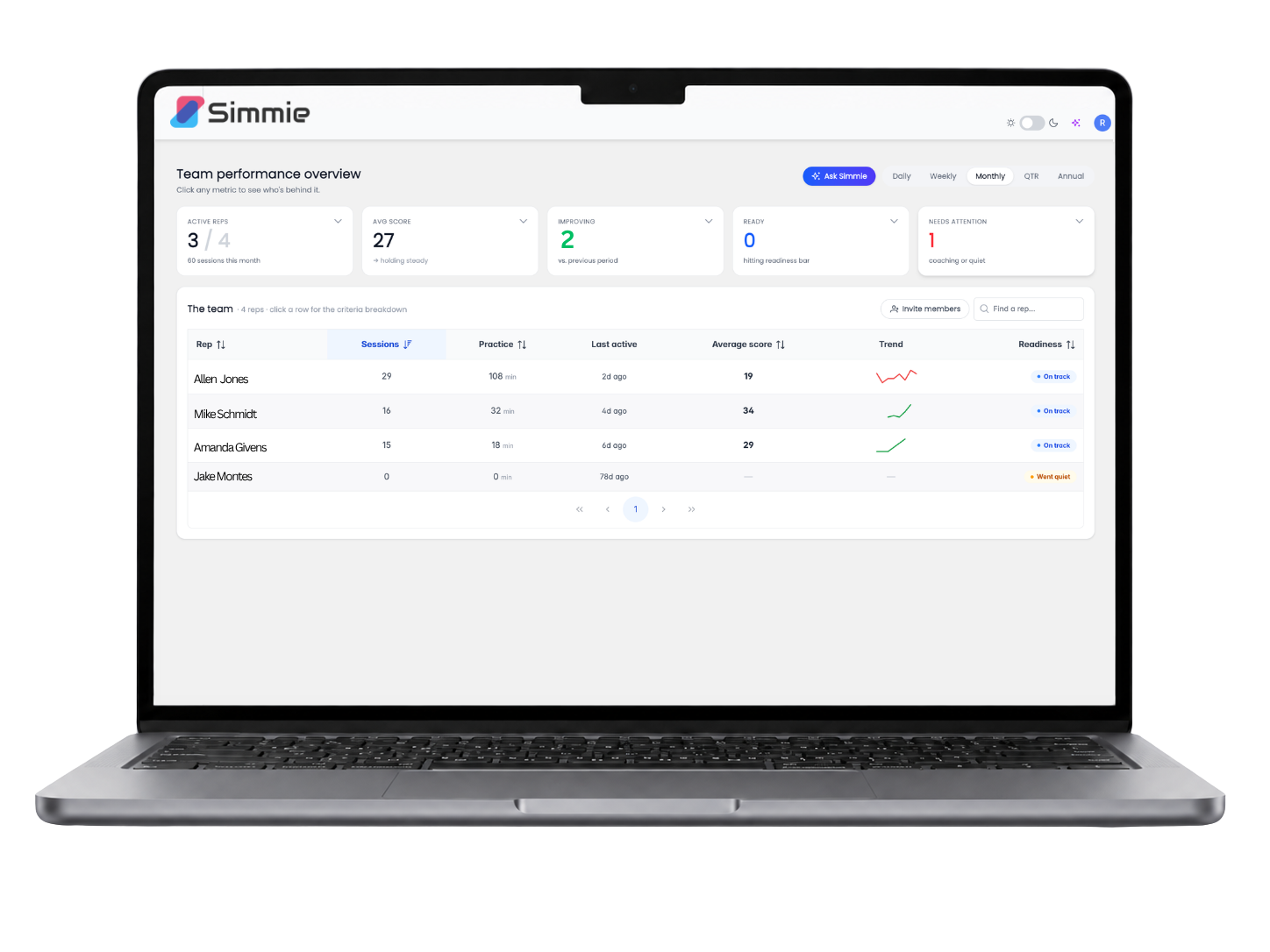
Manager dashboard
See the practice.
Understand the progress.
A completed session tells you a rep practiced. The manager dashboard helps you see how they performed, where they are improving, and which skills still need work.
Explore an anonymized skill gap report with performance detail and coaching priorities.
- See participation and progress
- Review practice activity, session counts, scores, and trends by rep. Distinguish someone who needs more repetitions from someone who needs a different coaching focus.
- Look beneath the average
- Use criterion-level skill gaps and scenario analysis to see where a rep is strong and where the conversation breaks down. Bring a specific moment to your next coaching session.
- Keep teams aligned
- Use shared scenarios and a consistent standard. Growth adds calibrated, locked rubrics; Enterprise adds account-level oversight across teams and locations.
Ask Simmie
Ask the question behind the dashboard.
Ask plain-language questions across your team's calls. Explore what reps are struggling with and what is changing without starting with a review of every transcript.
Use the answer to guide your review, then bring the relevant calls and skill gaps into a coaching conversation. Keep your judgment at the center of the readiness decision.
Ask Simmie is a manager feature inside the product. The public website chat answers product questions and cannot access your team's calls.
“Where is my team struggling with discovery?”
Look for patterns across conversations.
“How are reps handling price objections?”
Explore a specific skill in the calls.
“What should I review before my next coaching session?”
Start with a focused question, not a stack of transcripts.
Simmie Recommendations
The right next simulation.
Not another random rep.
Simmie Recommendations suggests simulations based on performance and skill gaps. Turn what a rep needs to improve into a relevant conversation to practice next.
Illustrative recommendation
Observed skill gap
Discounting before discovery
A rep responds to price pressure before exploring what the buyer values.
Recommended simulation
The lower-priced competitor
Practice with a buyer who challenges the price and needs a clearer reason to choose your offer.
Focus for the next attempt
Explore before defending
Ask about decision criteria, understand the comparison, and connect value to the buyer's priorities.
The recommendation points to practice. The rep does the work, Simmie Coach helps them reflect, and the manager can review progress over time.
MCP integrations
Connect the context.
Keep practice relevant.
MCP, the Model Context Protocol, connects compatible AI tools to Simmie. Bring the context you are working with in an AI assistant into simulation-building and scoring workflows.
Use compatible tools such as ChatGPT or Claude to help create simulations from your playbook or an approved transcript. Your assistant coordinates the work; Simmie runs the roleplay and coaching experience.
Explore Simmie MCPMCP access is listed in Pro and higher plans. Available actions depend on the client and workspace permissions. CRM, ATS, LMS, and other system integrations require supported configuration and may be separately scoped. Only use content you have permission to share.
One connected platform
Practice. Coach. Readiness.
Have the conversation. Learn from it. Know what to practice next.
Explore the platform
Practice
Realistic simulations, shaped around your sales conversations.
Explore AI sales roleplayExplore the platform
Coach
In-the-moment support and a clear way to improve after every call.
Explore AI sales coachingYou are here
Readiness
Team visibility, answers, and recommended simulations to close skill gaps.
Make practice part of how your team gets ready.
Start with a free account, explore the platform, and choose the team capabilities that fit your coaching program.
Feature availability and usage depend on your plan. Start free, then choose what fits.
Sales readiness FAQs
A sales readiness dashboard brings practice activity, scores, progress, and skill gaps into one view so managers can see where reps need support. Simmie adds Ask Simmie for questions across team calls and recommended simulations for targeted practice. These signals inform coaching decisions rather than guaranteeing real-call outcomes.
Manager views show practice activity, scores, readiness, progress by rep, criterion-level skill gaps, and scenario analysis. Enterprise adds account-level oversight across teams and locations. These signals support a manager's judgment; a simulation score does not guarantee performance on a real call.
Ask Simmie is an in-product manager feature for plain-language questions across a team's calls. It helps managers explore patterns and focus their review. It is separate from this website's public sales chat, which cannot access private calls or dashboards.
It recommends simulations to practice next based on performance and skill gaps. The focus is targeted practice for reps, not a separate system of manager coaching assignments.
No. MCP connects compatible AI clients to Simmie tools. Actions depend on the client and workspace permissions. CRM-triggered practice, ATS or LMS workflows, and transcript integrations depend on supported configuration and agreed scope. Additional integration work may be a separately priced add-on.
Shared scenarios help teams practice consistently. Growth includes custom manager rubric calibration and locked rubrics. Enterprise adds account-level administration across locations. See pricing for current plan features and allowances.
Simmie is SOC 2 Type II certified and never trains on voice. Only upload or record conversations with appropriate permission and consent. Enterprise features include SSO and SCIM. The infrastructure page has more detail about security and deployment options.